
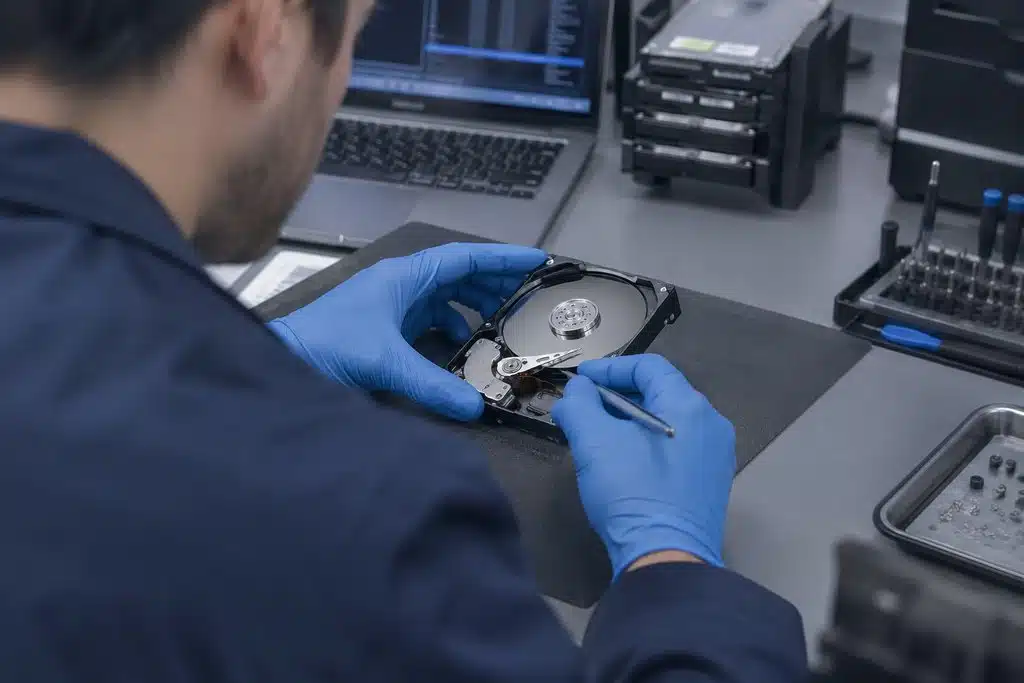
When drives fail and backups vanish, you need specialists who recover data from crashed, corrupted, and physically damaged storage devices.
You’ll find Data recovery service Tustin CA among the full range of services from GTI 24/7.
TL;DR: When your storage device fails, you risk losing years of business records, client databases, and irreplaceable personal files. Our data recovery service Tustin CA retrieves information from failed hard drives, solid-state drives, RAID configurations, and mobile devices through specialized lab techniques and cleanroom procedures.
A single drive failure can halt your operations, damage client relationships, and create compliance headaches that linger for months. You may notice clicking sounds, unrecognized devices, or the dreaded blue screen before total failure strikes. Understanding what happens during professional recovery helps you make faster decisions and avoid actions that permanently destroy retrievable information.
This page explains how you benefit from working with local recovery specialists, what the process looks like from your first call through final file delivery, and how to protect yourself against future data disasters. You will learn when DIY attempts help and when they cause irreversible harm, plus the specific scenarios where lab recovery becomes your only viable path forward.
You power on your computer and the screen stays black. You connect your external drive and hear a rhythmic clicking instead of the familiar whir. You open a spreadsheet and find corrupted characters where your quarterly numbers once lived. These moments trigger panic because you recognize how much depends on data you suddenly cannot reach.
The first hours after failure matter enormously. Your immediate response determines whether recovered data remains possible or becomes permanently unreachable. Many people instinctively restart repeatedly, download recovery utilities, or open the device casing, each action potentially scraping the platter surface or overwriting the very files they hope to save.
Mechanical hard drives spin platters at thousands of rotations per minute while a read/write head floats nanometers above the surface. Any impact, power surge, or gradual wear can disturb this delicate balance. Solid-state drives face different challenges: limited write cycles, controller failures, and firmware corruption that renders NAND chips inaccessible despite intact memory cells.
RAID arrays add complexity through distributed data across multiple drives. When one disk fails, the array may continue operating in degraded mode until a second failure collapses the entire set. You might not notice the first failure if monitoring alerts go unheeded, leaving you vulnerable to catastrophic simultaneous loss.

Shipping drives to distant facilities introduces delays, temperature extremes, and handling risks that compound your existing problems. When you choose local lab recovery, you maintain direct communication with technicians who examine your device personally rather than routing through call centers and shipping departments.
You can discuss your situation face-to-face, understand the technical assessment in plain language, and make informed decisions without pressure. Local specialists understand the business environments common across Orange County, from medical practices with strict retention requirements to creative studios managing massive video assets.
Professional data recovery service Tustin CA operates within controlled environments that filter airborne particles to levels thousands of times cleaner than typical office air. This matters because a single dust particle between the read head and spinning platter creates scratches that destroy magnetic coating permanently.
Technicians wear specialized garments, use precision tools, and follow protocols developed through years of handling sensitive storage media. You benefit from equipment investment that individual businesses cannot justify for occasional needs, accessing capabilities reserved for situations where standard software tools fail completely.

Here's exactly what to expect at every step, from your first call to the finished job.
Class 100 cleanroom environments prevent contamination during physical repair
Specialized imaging hardware reads sectors that standard tools cannot access
Firmware repair stations restore communication with unresponsive controllers
Donor parts inventory matches your exact drive model for head swaps
Secure chain-of-custody documentation tracks your device throughout the process
Understanding the timeline helps you set realistic expectations and coordinate with stakeholders who depend on the restored information. While every case differs based on failure type and damage extent, you can anticipate distinct phases that move from evaluation through final verification.
You begin with a detailed consultation where you describe symptoms, recent events, and the data's importance for prioritization. Technicians then perform initial diagnostics to classify the failure as logical, electrical, mechanical, or firmware-related. This assessment guides whether recovered data requires cleanroom intervention or can proceed through specialized software techniques.
During evaluation, specialists examine your device without attempting full recovery, identifying the specific components that failed and estimating complexity. You receive clear communication about what information appears retrievable, what challenges complicate the work, and how the proposed approach addresses your situation.
You approve the plan before significant work begins, ensuring alignment between your priorities and the technical approach. For business-critical situations, expedited handling may prioritize your case within the workflow, though actual timelines still depend on the physical work required rather than arbitrary scheduling.
Technicians execute the approved recovery plan, whether that means repairing electrical components, replacing damaged read heads in cleanroom conditions, or reconstructing RAID parameters across multiple drives. Throughout this process, they create working images rather than modifying your original media, preserving evidence of the original failure state.
You receive a file listing or remote verification option before final delivery, confirming that the recovered data matches your expectations. Only after your approval does the process conclude with secure transfer to your preferred storage medium, whether new drives you provide or encrypted cloud delivery for appropriate cases.

Modern smartphones contain vast personal and business information that many users never back up to secondary locations. When your phone suffers liquid damage, physical trauma, or software corruption, you face the same urgency as any hard drive failure with additional complications from proprietary encryption and soldered storage components.
Phone recovery demands specialized expertise distinct from traditional computer storage. Mobile devices integrate storage directly onto the mainboard with encryption keys tied to security processors, making simple chip removal insufficient for data access. Technicians must often repair the device enough to boot normally or exploit documented debugging interfaces that manufacturers reserve for their own use.
Liquid exposure represents the most frequent cause of phone data loss, whether from bathroom incidents, outdoor weather, or spilled beverages. Corrosion begins immediately upon contact, spreading across circuit board traces and component leads even after surface drying. Powering on a wet device accelerates electrochemical damage and may destroy previously recoverable components.
Physical damage from drops crushes solder connections beneath the screen assembly or bends the mainboard enough to fracture internal traces. Software failures from failed updates or malicious applications can encrypt or overwrite user partitions while leaving hardware physically intact. Each scenario requires different technical approaches that general repair shops rarely possess.

Your business may depend on RAID configurations for performance or redundancy, but these arrays create recovery scenarios far more complex than single-drive situations. When multiple drives fail sequentially or the controller malfunctions, you need specialists who understand stripe sizes, parity algorithms, and the subtle ways different RAID levels distribute information.
Many businesses mistakenly believe RAID redundancy eliminates backup needs. RAID protects against specific hardware failures but not deletion, corruption, malware, or site disasters. When recovery becomes necessary, the interdependence between drives means amateur attempts often destroy the very relationships that make reconstruction possible.
RAID 0 stripes data across drives for speed with no redundancy, meaning any single failure destroys the entire array. RAID 1 mirrors information for simplicity but cannot protect against simultaneous failures or corruption that replicates across both copies. RAID 5 and 6 distribute parity information, allowing survival of one or two drive failures respectively, yet reconstruction stresses remaining drives and may trigger cascading failures in aging arrays.
Nested configurations like RAID 10 or 50 combine approaches for specific performance and protection profiles, each adding layers that technicians must understand to reconstruct your information correctly. The order in which drives failed, whether any were replaced with mismatched models, and how the controller handled degradation all influence recovery strategy.

Recovering from failure teaches painful lessons about preparation gaps that seemed acceptable during normal operations. You can transform this experience into stronger resilience by implementing practices that reduce both failure likelihood and impact when prevention falls short.
The 3-2-1 backup strategy remains foundational: maintain three copies of important data, on two different media types, with one stored offsite. You automate this process because manual backup habits fail precisely when stress and workload peak. Cloud synchronization supplements but does not replace structured backup with versioning that protects against ransomware and accidental deletion.
Modern drives include Self-Monitoring, Analysis, and Reporting Technology (SMART) that tracks degradation indicators before catastrophic failure. You configure monitoring tools to alert on reallocated sectors, pending sectors, temperature excursions, and other parameters that predict problems days or weeks before data becomes inaccessible.
For RAID arrays, you verify that notification systems actually reach responsible personnel rather than disappearing into unmonitored mailboxes. You test replacement drive integration periodically, confirming that hot-spare activation and rebuild procedures function as documented rather than discovering failures during actual emergencies.

Your data stays locked down from the outside in, not bolted on after.
Configure automated backups with versioning and offsite replication
Monitor SMART indicators for all active storage devices
Test RAID rebuild procedures before emergencies occur
Maintain current documentation of array configurations and passwords
The internet overflows with free utilities and tutorial videos suggesting that anyone can recover data with patience and the right software. For specific logical corruption scenarios, these tools sometimes succeed, particularly when file system metadata rather than actual file content suffered damage.
However, running recovery software on failing hardware often causes irreversible platter damage as the drive struggles to read deteriorating sectors repeatedly. Each failed read attempt may degrade the magnetic surface further, transforming a recoverable mechanical issue into permanent data destruction that even cleanroom techniques cannot address.
You may reasonably try software approaches when the drive remains fully recognized by your system, files were recently deleted through normal operating system functions, and you have confirmed the drive passes basic health checks. You always work from an image or clone rather than the original, stopping immediately at any unusual sounds, delays, or error messages.
Even in favorable conditions, you limit attempts to non-destructive operations and maintain realistic expectations about fragmented files, overwritten data, and corrupted metadata that software cannot reconstruct. When uncertainty exists, professional evaluation costs far less than permanently losing information through well-intentioned amateur efforts.

You likely have specific concerns about security, success rates, and what to do immediately after discovering data loss. This section addresses the most common questions that local clients ask when first contacting recovery specialists.
Understanding these fundamentals helps you act decisively during stressful moments and evaluate service providers against consistent criteria. Your data's value justifies informed decision-making rather than panic-driven choices that compound the original problem.

Find your field below - odds are it's already on the list.
Find your town on the list below.
Review CISA backup guidance to learn how small businesses can protect critical files and test their ability to restore data.
Jump straight to any service on this page.
See the Data backup and recovery page for what's included, typical timelines, and the questions we hear most.
See the Data Backup Services Orange County page for what's included, typical timelines, and the questions we hear most.
For Deleted file recovery, the dedicated page covers scope, common questions, and turnaround.
For Data recovery consultation, the dedicated page covers scope, common questions, and turnaround.
Power down the device completely rather than restarting repeatedly. Disconnect the drive if external, or shut down the computer if internal. Avoid running disk utilities, defragmentation, or recovery software until you understand the failure type. Physical symptoms like clicking or grinding demand immediate professional attention, as continued operation destroys recoverable data. Keep the drive in a static-free bag at stable temperature until evaluation.
Timelines vary significantly based on failure complexity, parts availability, and your approval of the recovery plan. Simple logical recoveries may conclude within days, while mechanical failures requiring cleanroom work and donor parts extend the process. RAID reconstructions add time for array analysis and multi-drive coordination. You receive updated estimates after initial evaluation rather than generic promises that cannot account for your specific situation.
Professional services maintain strict confidentiality through encrypted storage, access logging, and personnel background verification. Your data remains isolated from other cases and is destroyed following successful delivery per documented retention policies. You may request specific security measures or compliance documentation if your industry requires particular handling procedures.
Physical damage does not automatically prevent recovery, though success depends on damage extent and subsequent handling. Dropped drives often suffer head assembly misalignment that cleanroom replacement resolves. Water damage requires immediate power disconnection and professional cleaning before corrosion destroys electrical contacts. You improve outcomes significantly by avoiding power-on attempts and seeking prompt evaluation.
Recovery capabilities span traditional hard disk drives, solid-state drives, hybrid configurations, RAID arrays, NAS devices, USB flash drives, memory cards, and mobile phones. Each technology demands specific expertise and equipment, from platter imaging for mechanical drives to chip-level work for soldered mobile storage. Not every case succeeds, but comprehensive evaluation determines feasibility before you commit to full recovery efforts.
Implement automated backup systems with versioning, test restoration procedures regularly, monitor drive health indicators, and maintain offline copies protected from ransomware. For business environments, document recovery responsibilities and ensure multiple personnel understand backup verification. Consider redundant storage for critical operations while recognizing that redundancy supplements rather than replaces structured backup practices.
★★★★★ 5.0 from 12 Google reviews
GTI is outstanding. Their team is knowledgeable, responsive, and genuinely committed to keeping business technology secure and running smoothly. Highly recommend them for reliable IT support and managed services in Orange County.
Used them for years for general IT support across multiple platforms. It was so nice always having support when we needed it. They were pro active on our security which was such a relief - never had issues.
We at One Stop Roofing have been working with GTI for over two years. We’ve had a great experience working with GTI. Their team is professional, responsive, and easy to work with. They’ve helped keep our systems secure without making things complicated. Highly recommend their services.
We had a wonderful experience with GTI. Ali and his team are extremely knowledgeable and professional, they know the IT and security landscape very well and have given us the peace of mind that we were looking for. They are very pro-active, provided solutions to problems, executed flawlessly, maintained steady service and vigilance, and introduced us to many colleagues that helped us with other adjacent issues. They have been a Godsend.! Couldn't recommend them enough and look forward to working with them for the foreseeable future.
Ali is absolutely the best. He's throrough and competent. I've know Ali for at least 15 years. Dependable and committed.
Ali and his team have been our IT support since we started in business almost 20 years ago. They are so helpful and knowledgeable and proactively keep us up and running. I wouldn’t hesitate to recommend them!
When your files disappear and backups fail, you need responsive specialists who understand the urgency of your situation. Call (949) 468-5550 now to discuss your data recovery service Tustin CA needs, or visit to start the evaluation process and learn what options exist for your specific device and failure type.